Leaked an API key? Do this right now
If an API key ended up in a public repo, a screenshot, a chat or your app's code, someone may already be using it. Here's what to do in the next fifteen minutes, in the order that limits the damage, and how to make the next leak a non-event.
The short answer
- Revoke the key at the provider first. Everything else can wait.
- Create a new key and keep it on your server only.
- Check usage and billing for spending you don't recognize.
- Find every place it leaked, and fix the habit that caused it.
- Clean up git history only after the old key is dead.
How keys usually leak
Committed to git
Deleting the file doesn't remove the key from your history. For public repos, GitHub reports some well-known key formats to the provider, who decides whether to revoke them. That's a safety net, not a plan.
Shipped in frontend code
Anything in a VITE_, NEXT_PUBLIC_ or REACT_APP_ variable is built into the JavaScript your visitors download. Anyone can find it with their browser's developer tools. Here's how to fix that.
Pasted somewhere it shouldn't be
Screenshots, screen recordings, support tickets, Discord messages and AI chat logs all count. If the key was ever visible to someone else, treat it as exposed.
Where to revoke common AI keys
Sign in and delete the leaked key first. Each link goes to that provider's key page.
| Provider | Key page | Key usually starts with |
|---|---|---|
| OpenAI | platform.openai.com/api-keys | sk- |
| Anthropic | console.anthropic.com/settings/keys | sk-ant- |
| Replicate | replicate.com/account/api-tokens | r8_ |
| OpenRouter | openrouter.ai/settings/keys | sk-or- |
| fal | fal.ai/dashboard/keys | No fixed prefix |
| SyncNode | syncnode.ai/api_keys, then Rotate | sn_live_ |
What to do, in order
-
Revoke the key now
Delete or revoke it on the provider's key page above. Don't wait until you've found how it leaked. GitHub's guidance is to revoke or rotate a leaked secret first, because then it no longer works for anyone.
-
Create a new key and update your app
Add the new key wherever your server reads secrets, such as your host's environment variables or your builder's Secrets panel, then redeploy. Never put it back where the old one leaked.
-
Check usage and billing
Look at the provider's usage page for spikes you didn't cause. If you find charges that aren't yours, contact the provider's support with the dates and the key's name. Refunds are up to them, so act quickly.
-
Find every place it leaked
Search your git history, your built frontend files, old deploys, screenshots and chats with the commands below. One leaked key usually means a habit, so check for other keys stored the same way.
-
Clean up git history, after revoking
If the key was committed, GitHub recommends
git-filter-repoto remove it. It rewrites commits and can't clean other people's clones or forks, which is exactly why revoking comes first. -
Put limits in place
Set the lowest spending limit each provider allows. OpenRouter, for example, lets you cap spending per key, so a leaked key has a ceiling.
Why SyncNode makes the next leak smaller
You can't promise a key will never leak. You can decide what a leak costs. SyncNode keeps your provider keys out of your app, so there's less to leak and less to clean up.
One key to revoke, not five
Your app holds a single SyncNode key. Rotate it on the API Keys page and the old one stops working within 30 seconds, while your provider keys stay untouched.
Provider keys never reach your code
Your OpenAI, Replicate, OpenRouter and fal keys live in the SyncNode dashboard, so they can't end up in a commit, a frontend bundle or a screenshot.
A leaked app key can't reveal the rest
Reading or changing provider keys needs your signed-in dashboard. The API key your app uses can run tasks, but it can't see them.
A record of what ran
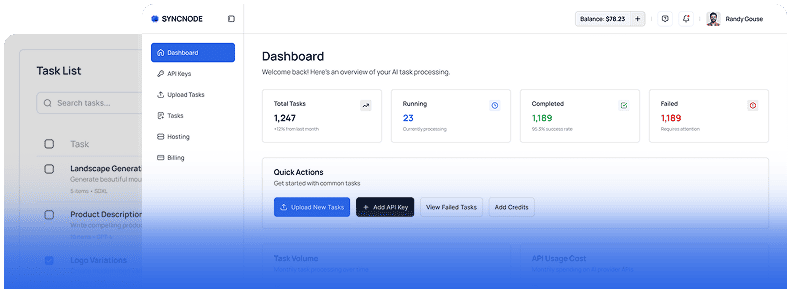
Every task appears on your dashboard with its status, cost, inputs and outputs, so you can see what happened while a key was exposed.
A spending ceiling you choose
SyncNode's fees come from a pay-as-you-go balance with a recharge amount you set, and you can still keep limits at each provider.
Safe for AI coding tools
Your assistant builds against one documented API and never needs a provider key in your project, which removes the most common way keys leak.
Find where it leaked
Run these in your project folder. Search for the first few characters of the key, never the whole key, and swap sk- for your key's prefix.
# Every commit that added or removed text starting this way
git log -p --all -S "sk-abc12"

# Your built frontend, after running your build command
grep -rn "sk-abc12" dist build .next/static 2>/dev/null

# Anything key-shaped in files you're about to commit
git diff --cached | grep -nE "sk-|r8_|sn_live_"
Then make sure real keys can't be committed again. Add this to .gitignore and keep a .env.example with placeholders for your teammates:
# Real keys never go into git
.env
.env.*
!.env.example
What SyncNode doesn't fix
No tool removes all the risk, so here's the honest list.
- It can't un-leak a key. If a provider key is already exposed, revoke it at the provider. SyncNode helps the next time, not this one.
- Your SyncNode key is still a secret. Until you rotate a leaked
SYNCNODE_API_KEY, it can run tasks on your account, so rotate it the moment you suspect a leak. - Trust moves to SyncNode. Your provider keys live with us, so keep a spending limit at each provider as well.
- There's a small fee. It's $0.02 per AI call and $0.005 per moderation check, on top of your provider's charges.
Common questions
No. The key stays in your git history, in anyone's clones and in any forks. Revoke it at the provider, and the copies stop mattering.
For public repositories, GitHub checks commits for many providers' key formats and reports matches to the provider, who decides whether to revoke the key or contact you. Don't rely on it. Revoke the key yourself.
Revoke first. Once the key no longer works, rewriting history is optional, and GitHub warns it has side effects such as changed commit hashes and problems for collaborators.
That's up to each provider. Contact their support quickly with the dates, the key's name and what you've already done.
More guides
How to keep your API keys safe in Lovable
Read the guideHow to keep your API keys safe in Bolt.new
Read the guideHow to keep your API keys safe in Replit
Read the guideHow to keep your API keys safe in Cursor
Read the guideHow to hide your API key in React, Vite and Next.js
Read the guideHow to protect yourself as a vibe coder
Read the full checklistThese steps follow GitHub's and the providers' official docs, checked on November 10, 2026:
- GitHub: Removing sensitive data from a repository
- GitHub: Secret scanning for partners
- OpenRouter: API key limits
Product names are trademarks of their owners. SyncNode isn't affiliated with or endorsed by them. This guide is general information, not legal or security advice for your specific situation.
Ship fast. Stay protected.
Join the builders behind 9M+ AI runs on SyncNode. Lock away your keys and moderate your users in one afternoon, with $5 free to start.
Start free